
How to create Pop ups in Xcelsius 2008?

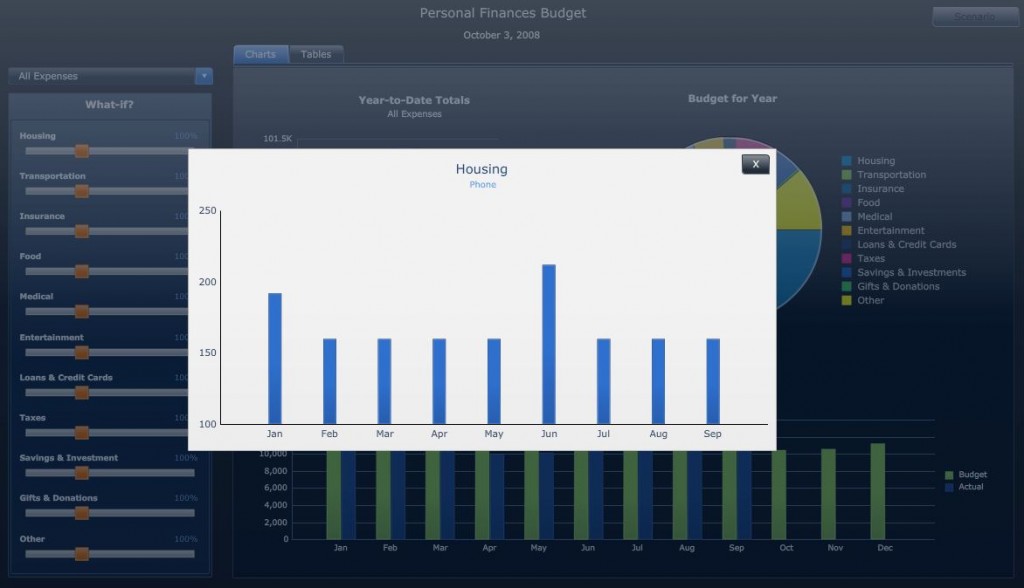
Ever wondered how to create pop ups in Xcelsius? Here is a short video that I recorded to demonstrate the same. I was able to achieve this using the Push Button component which is one of the new components that came along with Xcelsius SP3. Although it looks like a simple selector component , the Push Button can be very powerful when put to good use. Prior to SP3, this could have been possible with a toggle button, however it was an alternative approach rather than a straight forward one.
Xcelsius Pop Ups

Pop ups can be a great feature in Dashboards as you can save a lot of screen real estate and also shift the user focus when you want their attention to be drawn to a detail. Using pop ups you can make your dashboard even more interactive.

Video after the jump!

If you enjoyed this post, make sure you subscribe to my RSS feed!

Related Posts:

24 Comments

  1. Annabelle CAUSSIN says:

    Thank you, now I know how I can use the Push button component. I like the solution with the “X” label to close the pop-up !

  2. Bhavna Shukla says:

    Excellent video! Explanation is so clear with real time example! Thank you much.

  3. Kalyan Verma says:

    @Annabelle @Bhavna Glad it helped you!

    1. Bhikhu says:

      Hi Kalyan,
      I Hope u can solve my Problem.
      This is Bhikhu Rajbhar, i am user of xcelsius2008sp3. it’s really very coooooool software to visualize ur data. and i love to work on it.
      but i have problem when i am importing the .xlsx file in xcelsius, i am not getting the rows more then 65536.
      Is their any row limitation for xcelsius2008sp3 ??????????????????
      Kindly revert back asap…., it will very useful for me, if i will get ur early response.

  4. Prasanth reddy says:

    Crystal clear! Intelligent Business Solution to conjure a Pop-up out of push button component. Thanks for the video.

  5. rajen says:

    Thanks again for producing another excellent video tutorial. I have used the toggle button to do something similar in the past, put now will try the push button instead.

    1. hlep!! says:

      hi,
      While importing any excelfile, i want those sheets to be added to my old excelfiel,in xcelsius it relplacing the previous excel files …is there any way to do so …
      Thanks in advance

  6. Arvind says:

    Hi,

    Going through your work…excellent job Kalyan.

    What is the link for traffic Streetlight component. If you can share, it would be of great help.

    Arvind

  7. Rita says:

    Thanks for such a nice demo. Very helpful.

  8. [...] This post was mentioned on Twitter by kalyanverma. kalyanverma said: How to create Pop ups in Xcelsius 2008? http://bit.ly/a6j8Kw [...]

  9. Amy says:

    [...] This post was mentioned on Twitter by kalyanverma. kalyanverma said: How to create Pop ups in Xcelsius 2008? http://bit.ly/a6j8Kw [...]

  10. Paul says:

    Excellent video! Explanation is so clear with real time example! Thank you much.

  11. kenmax says:

    this is very great!!
    thanks for the video

  12. Rama Krishna Kota says:

    Kalyan,
    Thanks for the tip, with a clearly explained video.
    The work around is great.

    Regards
    Rama Krishna Kota

  13. Vinay says:

    Hi Kalyan, my requirement is to create a pop-up on a title of my chart(it just contains some description of the chart).
    Here is what i did:
    a) created 2 label components( One for my title and one for my pop-up)
    b) created a toggle button beneath the label component(send to back)
    c) created a push button like you did above, and configured dynamic visibility

    Now when i click on the toggle button for the first time, the pop-up appears perfectly, then i click on push button to close it. But the problem is the toggle button is now in ‘On’ position….so to have the pop-up come again i have to click it to off and then to On again(2 clicks)….any ideas? In other words…. I want to clear the toggle selection also when i click on the pop-up button.

    Thanks,

  14. Kalyan Verma says:

    @Vinay, send your example XLF to admin@myxcelsius.com. I will take a look.

  15. Gourav Sengupta says:

    Kalyan,

    What impressed me most is yours presentation style. Clear, simple and to-the-point.

    Thanks once again.

    Regards,
    Gourav

  16. Pretty good post…

    I just stumbled upon your blog and wanted to say that I have really enjoyed reading your blog posts. Any way I’ll be subscribing to your feed and I hope you post again soon….

  17. Nelson says:

    I dont see any video…i can only see a picture.
    What means by Video after the jump??

  18. Steve Gillman says:

    Very nice presentation. Your pacing and timing made it easy to follow. Great idsea too!

  19. Radha says:

    Hi Kalyan,

    Great info thanks. Well, I have created a BMI calculator and I used label as my pop up. Now, if a person’s BMI is 18, then the label should state Normal. I have referenced this label to the BMI Calculator. The problem is the label is not taking the vlookup. I am not sure what the solution is. I have tried many avenues. Could you please help me on this one? Thanks.

  20. krish says:

    Hi Kalyan,

    It was a wonderful presentation… One quick question… Is there a way to close the Window Browser??? When we construct a dashboard and export it to BO Portal, when we click any URL if it opens in another window… I just wanna close that browser window. Are there any components in XCelsius that can sort out this issue??? Any inputs Please…

    Thanks in Advance…

Leave a Reply

*